<?xml version="1.0" encoding="utf-8"?>
<feed xmlns="http://www.w3.org/2005/Atom">
    <id>http://v2.shuobude.top:8888</id>
    <title>嘘~说不得</title>
    <updated>2023-06-17T11:58:14.569Z</updated>
    <generator>https://github.com/jpmonette/feed</generator>
    <link rel="alternate" href="http://v2.shuobude.top:8888"/>
    <link rel="self" href="http://v2.shuobude.top:8888/atom.xml"/>
    <subtitle>温故而知新&lt;br&gt;yinxing</subtitle>
    <logo>http://v2.shuobude.top:8888/images/avatar.png</logo>
    <icon>http://v2.shuobude.top:8888/favicon.ico</icon>
    <rights>All rights reserved 2023, 嘘~说不得</rights>
    <entry>
        <title type="html"><![CDATA[frp配置教学]]></title>
        <id>http://v2.shuobude.top:8888/post/kuIbgpLNj/</id>
        <link href="http://v2.shuobude.top:8888/post/kuIbgpLNj/">
        </link>
        <updated>2023-06-17T11:54:04.000Z</updated>
        <content type="html"><![CDATA[<h2 id="当前文档已经迁移请移步到最新地址">当前文档已经迁移，请移步到最新地址</h2>
<h3 id="点我跳转"><a href="https://www.shuobude.top/All-in-one/frp/">点我跳转</a></h3>
]]></content>
    </entry>
    <entry>
        <title type="html"><![CDATA[frp配置教学-不维护了]]></title>
        <id>http://v2.shuobude.top:8888/post/i-Zg1POQu/</id>
        <link href="http://v2.shuobude.top:8888/post/i-Zg1POQu/">
        </link>
        <updated>2023-03-09T15:05:44.000Z</updated>
        <content type="html"><![CDATA[<h1 id="概念">概念</h1>
<p>这个时候你需要了解的几个概念：</p>
<p><strong>服务器：</strong><br>
- 你自己的,有公网IP的机器<br>
- 我的服务器，提供给你一个IP地址或者网址<br>
<strong>服务端：</strong><br>
-  需要对外提供服务的上面机器（PC,NAS等）<br>
<strong>客户端：</strong><br>
- 发起访问的机器(pc,手机)<br>
<strong>端口：</strong><br>
- 你的服务端需要对外提供的服务<br>
- 服务器上的端口，公网访问时使用的端口<br>
<strong>连接方式：</strong><br>
- 在配置完成后，通过访问 服务器上的端口进行访问</p>
<h1 id="1-下载程序">1、下载程序</h1>
<p>http://v2.shuobude.top:8888/file/down/</p>
<p>按需求下载对应版本： windows、linux 当前提供64位版本，其他版本可联系下载，客户端使用 frpc<br>
我的下载路径是 <code>C:\2345Downloads\frp_0.47.0_windows_amd64</code><br>
进入路径，执行第二步</p>
<h1 id="2-配置文件-frpcini修改建议">2、配置文件 frpc.ini修改建议</h1>
<p>测试配置<br>
<a href="http://v2.shuobude.top:8888/file/down/frpc.ini">http://v2.shuobude.top:8888/file/down/frpc.ini</a></p>
<p>江苏服务器默认配置：<br>
<a href="http://v2.shuobude.top:8888/file/down/js.ini">http://v2.shuobude.top:8888/file/down/js.ini</a></p>
<p>浙江服务器默认配置：<br>
<a href="http://v2.shuobude.top:8888/file/down/zj.ini">http://v2.shuobude.top:8888/file/down/zj.ini</a></p>
<p>下载配置文件后，建议改名为 frpc.ini</p>
<h3 id="font-colorred-默认配置可以下载过去修改一下user-和服务配置即可使用-font"><font color=red>  默认配置可以下载过去，修改一下user 和服务配置即可使用 </font></h3>
<h2 id="不会写配置用配置生成工具">不会写配置，用<a href="https://www.shuobude.top/All-in-one/frp/frpc_config_tools.html">配置生成工具</a></h2>
<h3 id="备用配置生成工具"><a href="http://v2.shuobude.top:8888/gen_conf/">备用配置生成工具</a></h3>
<h2 id="21-配置服务">2.1 配置服务</h2>
<h3 id="remote_port">remote_port</h3>
<ul>
<li>江苏服务器是 <code>10005-11000</code> 可用</li>
<li>浙江服务器是 <code>7005-7300</code> 可用</li>
<li>专用线路(<code>22,80,443,10000-10002</code>)不能使用，其他皆可使用</li>
</ul>
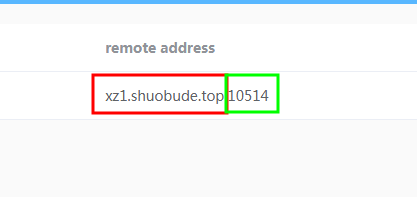
<p>不要随意指定，有可能不能使用，如果未指定，通过访问默认管理页面地址 http://127.0.0.1:7400  可以查看已经在线管理自己的配置</p>
<figure data-type="image" tabindex="1"><img src="http://v2.shuobude.top:8888/post-images/1680189770621.png" alt="" loading="lazy"></figure>
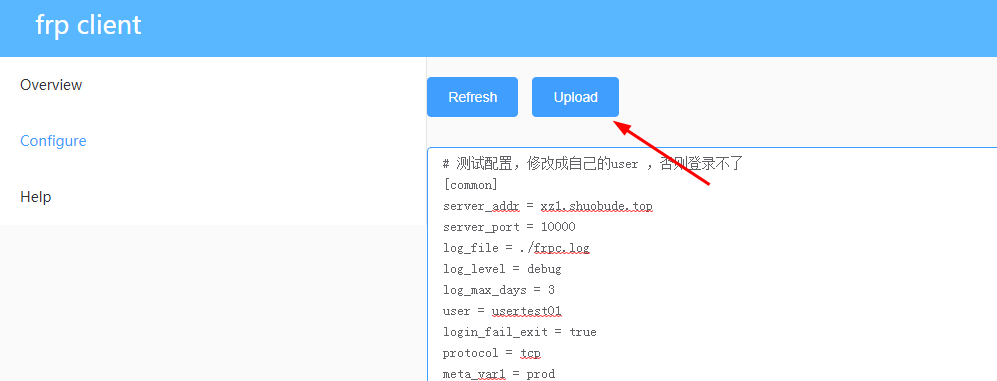
<p>在线修改完配置，点 upload 即可生效，不需要再去手动重启服务<br>
<img src="http://v2.shuobude.top:8888/post-images/1680189882446.png" alt="" loading="lazy"></p>
<h3 id="服务配置说明">服务配置说明</h3>
<p>因为不支持 80/443 不推荐使用 http/https ，网页类型的服务用 tcp 也可以实现且不需要备案。<br>
如果想用自己的域名，可以在自己的域名配置中，添加CNAME记录，指向服务器的域名地址。</p>
<p>假设本地的linux服务器22端口需要被公网访问，IP地址 192.168.1.1</p>
<pre><code class="language-bash"> # 这里根据实际情况，修改成对应的服务名称，方便识别与管理
[ssh] #一个名字，方便记忆就行
#type默认使用tcp ，如果是网站服务，则需要与我确认
type = tcp
#端口由我提供，不写则随机，需要联系我查看
remote_port = 7010
#local_ip你自己指定
local_ip =192.168.1.1
 #local_port你自己指定
local_port = 22
# 下面两个必须开启，不然可以登录，无法连接
use_encryption = true
use_compression = true
health_check_type = tcp
health_check_timeout_s = 5
health_check_max_failed = 3
health_check_interval_s = 60
</code></pre>
<p>更多配置参考 ： http://v2.shuobude.top:8888/post/3TYmndH4U/</p>
<h1 id="3-如果需要开机启动可以配置成服务">3、如果需要开机启动，可以配置成服务</h1>
<h2 id="31-windows">3.1 Windows</h2>
<p>http://v2.shuobude.top:8888/file/down/nssm-2.24/<br>
下载 nssm，和frp 放一起就可以<br>
1、打开cmd，进入frp目录<br>
<img src="http://v2.shuobude.top:8888/post-images/1678374466670.png" alt="" loading="lazy"></p>
<p>执行命令</p>
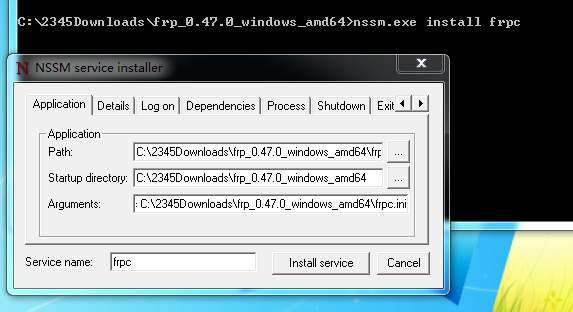
<pre><code>nssm.exe install frpc
</code></pre>
<p>会弹出一个窗口<br>
<img src="http://v2.shuobude.top:8888/post-images/1678374490979.png" alt="" loading="lazy"></p>
<p>path : frpc 所在的路径 <code> (C:\2345Downloads\frp_0.47.0_windows_amd64\frpc.exe)</code></p>
<p>Arguments ： <code>-c C:\2345Downloads\frp_0.47.0_windows_amd64\frpc.ini</code><br>
点击<code> Install service</code> 即可安装，在系统服务中就可以看到，会随机启动。nssm其他功能自行研究</p>
<h2 id="32-linux">3.2 Linux</h2>
<p>直接运行，frpc -c frpc.ini ,如果需要放后台</p>
<pre><code>nohup frpc -c frpc.ini &amp;
</code></pre>
<h1 id="4-如果想手动启动可以在frpc目录下执行cmd启动">4、如果想手动启动，可以在frpc目录下执行cmd启动</h1>
<p><img src="http://v2.shuobude.top:8888/post-images/1678374555293.png" alt="" loading="lazy"><br>
用此方法不能关闭cmd窗口。</p>
<h1 id="联系老板">联系老板</h1>
<figure data-type="image" tabindex="2"><img src="http://cdn.shuobude.top/frp/wx.jpg" alt="二维码" loading="lazy"></figure>
]]></content>
    </entry>
    <entry>
        <title type="html"><![CDATA[收费说明]]></title>
        <id>http://v2.shuobude.top:8888/post/m/</id>
        <link href="http://v2.shuobude.top:8888/post/m/">
        </link>
        <updated>2022-11-07T14:40:39.000Z</updated>
        <content type="html"><![CDATA[<h1 id="重点关注">重点关注</h1>
<p><strong><font color=red>nas穿透不支持 445端口，即直接挂载使用（\\）方式，只能使用网页访问</font></strong></p>
<p><strong><font color=red>frp </font> 支持 <code>p2p</code>,<code>stcp</code>,<code>xtcp</code> <font color=red>方式访问445，需要部署两个客户端，即nas + 电脑 各一个，此方式不保证一定能用，不同运营商和电脑限制不一样</font></strong></p>
<h1 id="标准-httphttps-专用frp服务器">标准 http/https 专用frp服务器</h1>
<blockquote>
<p>8M 带宽共享，可以满足日常网站（个人网站、博客等）需求<br>
大流量（视频、下载）web 服务不推荐使用，大流量服务器可以使用非标准的 http/https ，价格实惠</p>
</blockquote>
<p><strong>标准 http/https  :  20元/月</strong></p>
<blockquote>
<p>http 需要备案过的域名，https 需要备案过的域名 + 证书<br>
提供子域名 + 证书（15元）证书有效期是一年，<font color=red>服务结束即回收</font></p>
</blockquote>
<h1 id="服务搭建">服务搭建</h1>
<ul>
<li>服务器搭建 + 客户端（协助配置一个客户端案例，其他自己配置,可以指导）   30元/次</li>
<li>服务器搭建（客户端自己配置,技术指导） 20元/次</li>
<li>服务器搭建（客户端自己配置,不提供技术指导） 10元/次</li>
</ul>
<h1 id="技术支持">技术支持</h1>
<ul>
<li>frp、nps客户端排错 20元/次</li>
<li>frp、nps 服务器排错 10元/次</li>
<li>其他问题支持，价格是情况定价。支持范围（linux，docker，openwrt，nps，frp，各类nas等），解决不了不收费</li>
</ul>
<p>nps添加端口报错：<br>
<font color=red>“无法打开端口，因为它可能被占用或不再被允许，说明端口不可用”</font><br>
解决办法：<br>
从端口范围重新选择即可</p>
<h1 id="其他报错微信咸鱼联系">其他报错微信/咸鱼联系</h1>
<p><img src="https://qn.shuobude.top/frp/weixin.png" alt="二维码" loading="lazy"><br>
<img src="http://cdn.shuobude.top/frp/wx.jpg" alt="二维码" loading="lazy"></p>
]]></content>
    </entry>
    <entry>
        <title type="html"><![CDATA[frps_nps配置文件模板]]></title>
        <id>http://v2.shuobude.top:8888/post/WKLEIPFQQ/</id>
        <link href="http://v2.shuobude.top:8888/post/WKLEIPFQQ/">
        </link>
        <updated>2022-11-06T14:53:19.000Z</updated>
        <content type="html"><![CDATA[<h1 id="frps">frps</h1>
<p>防火墙需要放行 ： 80，443，7000-7200， 如果不限制端口，则都需要放行<br>
需要修改的地方包括：</p>
<ul>
<li>管理页面账号密码</li>
<li>token</li>
</ul>
<p>可以修改</p>
<ul>
<li>放行端口</li>
</ul>
<pre><code>[common]
bind_addr = 0.0.0.0
bind_port = 7000
bind_udp_port = 7000
kcp_bind_port = 7001

# if you want to support virtual host, you must set the http port for listening (optional)
# Note: http port and https port can be same with bind_port
vhost_http_port = 80
vhost_https_port = 443

# response header timeout(seconds) for vhost http server, default is 60s
vhost_http_timeout = 60

# tcpmux_httpconnect_port specifies the port that the server listens for TCP
# HTTP CONNECT requests. If the value is 0, the server will not multiplex TCP
# requests on one single port. If it's not - it will listen on this value for
# HTTP CONNECT requests. By default, this value is 0.
# tcpmux_httpconnect_port = 1337

# set dashboard_addr and dashboard_port to view dashboard of frps
# dashboard_addr's default value is same with bind_addr
# dashboard is available only if dashboard_port is set
dashboard_addr = 0.0.0.0
dashboard_port = 7002

# dashboard user and passwd for basic auth protect
dashboard_user = frps
dashboard_pwd = frps@2022

# enable_prometheus will export prometheus metrics on {dashboard_addr}:{dashboard_port} in /metrics api.
log_file = /tmp/frps.log

# trace, debug, info, warn, error
log_level = debug

log_max_days = 3

authentication_method = token

# auth token
token = xxxxxxxxxxx # 需要修改 


# only allow frpc to bind ports you list, if you set nothing, there won't be any limit
allow_ports = 7006-7200 # 可以修改
# 注释 allow_ports 表示不做端口限制

# pool_count in each proxy will change to max_pool_count if they exceed the maximum value
max_pool_count = 5

# max ports can be used for each client, default value is 0 means no limit
max_ports_per_client = 0

# when subdomain is test, the host used by routing is test.frps.com
subdomain_host = frp.example.com   # 需要修改 


# specify keep alive interval for tcp mux.
# only valid if tcp_mux is true.
tcp_mux_keepalive_interval = 60

# tcp_keepalive specifies the interval between keep-alive probes for an active network connection between frpc and frps.
# If negative, keep-alive probes are disabled.
tcp_keepalive = 7200

# custom 404 page for HTTP requests
# custom_404_page = /path/to/404.html

# specify udp packet size, unit is byte. If not set, the default value is 1500.
# This parameter should be same between client and server.
# It affects the udp and sudp proxy.
udp_packet_size = 1500

# Enable golang pprof handlers in dashboard listener.
# Dashboard port must be set first
pprof_enable = false

# tls_only specifies whether to only accept TLS-encrypted connections. By default, the value is false.
tls_only = frp

tls_cert_file = /etc/frp/tls/cert.crt   #证书配置需要修改或者注释
tls_key_file = /etc/frp/tls/cert.key #证书配置需要修改或者注释
#tls_trusted_ca_file = ca.crt
</code></pre>
<h1 id="frpc">frpc</h1>
<p>参考配置说明  http://v2.shuobude.top/post/3TYmndH4U/<br>
通用配置</p>
<pre><code>[common]
server_addr = frpserver.com # frps 服务器地址
server_port = 8085 # frps 服务器端口

log_file = /tmp/frpc.log
log_level = info
log_max_days = 3
token = xxxxx # frps 服务器token 

user = user # 不分类可以不用配置
login_fail_exit = true
protocol = tcp
#subdomain = frpserver.com # 如果有域名可以配置，没有就注释掉

</code></pre>
<h1 id="nps">nps</h1>
<p>除了端口，可以不修改<br>
防火墙需要放行 ：  如果不限制端口，则都需要放行</p>
<ul>
<li>tcp: 80,443,9000-9299</li>
<li>udp: 9001-9005</li>
</ul>
<pre><code>appname = nps
#Boot mode(dev|pro)
runmode = pro

#HTTP(S) proxy port, no startup if empty
http_proxy_ip=0.0.0.0
http_proxy_port=80
https_proxy_port=443
https_just_proxy=true
#default https certificate setting
https_default_cert_file=/etc/nps/conf/server.pem
https_default_key_file=/etc/nps/conf/server.key

##bridge
bridge_type=tcp
bridge_port=9000
bridge_ip=0.0.0.0

# Public password, which clients can use to connect to the server
# After the connection, the server will be able to open relevant ports and parse related domain names according to its own configuration file.
#public_vkey=123

#Traffic data persistence interval(minute)
#Ignorance means no persistence
flow_store_interval=5

# log level LevelEmergency-&gt;0  LevelAlert-&gt;1 LevelCritical-&gt;2 LevelError-&gt;3 LevelWarning-&gt;4 LevelNotice-&gt;5 LevelInformational-&gt;6 LevelDebug-&gt;7
log_level=7
log_path=/tmp/nps.log

#Whether to restrict IP access, true or false or ignore
ip_limit=false

#p2p
p2p_ip=p2p.nps.com # 换成自己的服务器或者IP 
p2p_port=9001

#web
web_host=p2p.nps.com # 换成自己的服务器或者IP 
web_username=nps
web_password=Nps@2022
web_port = 9088
web_ip=0.0.0.0
web_base_url=
web_open_ssl=true
web_cert_file=/etc/nps/conf/server.pem
web_key_file=/etc/nps/conf/server.key
# if web under proxy use sub path. like http://host/nps need this.
#web_base_url=/nps

#Web API unauthenticated IP address(the len of auth_crypt_key must be 16)
#Remove comments if needed
#auth_key=test
auth_crypt_key =TnBzQDIwMjIK

allow_ports=9000-9299

#Web management multi-user login
allow_user_login=true
allow_user_register=false
allow_user_change_username=true


#extension
allow_flow_limit=true
allow_rate_limit=true
allow_tunnel_num_limit=true
allow_local_proxy=true
allow_connection_num_limit=true
allow_multi_ip=true
system_info_display=true

#cache
http_cache=true
http_cache_length=1024

#get origin ip
http_add_origin_header=true

#pprof debug options
#pprof_ip=0.0.0.0
#pprof_port=9999

#client disconnect timeout
disconnect_timeout=60
</code></pre>
<h1 id="npc">npc</h1>
<pre><code>参考服务器上的配置说明。
</code></pre>
<p>frps.service 配置  (/usr/lib/systemd/system/frps.service)<br>
部分系统可用（系统支持systemd） : centos7及以上，ubuntu16 及以上</p>
<pre><code class="language-bash">[Unit]
Description=Frp Server Service
After=network.target

[Service]
Type=simple
User=root
Restart=on-failure
RestartSec=5s
ExecStart=/usr/local/bin/frps -c /etc/frp/frps.ini
LimitNOFILE=1048576

[Install]
WantedBy=multi-user.target
</code></pre>
<p>frpc.service 配置 (/usr/lib/systemd/system/frpc.service)<br>
部分系统可用（系统支持systemd） : centos7及以上，ubuntu16 及以上</p>
<pre><code class="language-bash">[Unit]
Description=Frp Client Service
After=network.target

[Service]
Type=simple
User=frp
Restart=on-failure
RestartSec=5s
ExecStart=/usr/local/bin/frpc -c /etc/frp/frpc.ini
ExecReload=/usr/local/bin/frpc reload -c /etc/frp/frpc.ini

[Install]
WantedBy=multi-user.target
</code></pre>
]]></content>
    </entry>
    <entry>
        <title type="html"><![CDATA[frp常见配置]]></title>
        <id>http://v2.shuobude.top:8888/post/3TYmndH4U/</id>
        <link href="http://v2.shuobude.top:8888/post/3TYmndH4U/">
        </link>
        <updated>2022-09-03T03:23:21.000Z</updated>
        <content type="html"><![CDATA[<h1 id="常见的-frp-配置">常见的 frp 配置</h1>
<pre><code>[ssh]
# tcp | udp | http | https | stcp | xtcp, default is tcp
type = tcp
local_ip = 127.0.0.1
local_port = 22
# limit bandwidth for this proxy, unit is KB and MB
bandwidth_limit = 1MB
# true or false, if true, messages between frps and frpc will be encrypted, default is false
use_encryption = false
# if true, message will be compressed
use_compression = false
# remote port listen by frps
remote_port = 6001
# frps will load balancing connections for proxies in same group
group = test_group
# group should have same group key
group_key = 123456
# enable health check for the backend service, it support 'tcp' and 'http' now
# frpc will connect local service's port to detect it's healthy status
health_check_type = tcp
# health check connection timeout
health_check_timeout_s = 3
# if continuous failed in 3 times, the proxy will be removed from frps
health_check_max_failed = 3
# every 10 seconds will do a health check
health_check_interval_s = 10
# additional meta info for each proxy
meta_var1 = 123
meta_var2 = 234
</code></pre>
<pre><code>[ssh_random]
type = tcp
local_ip = 127.0.0.1
local_port = 22
# if remote_port is 0, frps will assign a random port for you
remote_port = 0
</code></pre>
<pre><code># if you want to expose multiple ports, add 'range:' prefix to the section name
# frpc will generate multiple proxies such as 'tcp_port_6010', 'tcp_port_6011' and so on.
[range:tcp_port]
type = tcp
local_ip = 127.0.0.1
local_port = 6010-6020,6022,6024-6028
remote_port = 6010-6020,6022,6024-6028
use_encryption = false
use_compression = false
</code></pre>
<pre><code>[dns]
type = udp
local_ip = 114.114.114.114
local_port = 53
remote_port = 6002
use_encryption = false
use_compression = false
</code></pre>
<pre><code>[range:udp_port]
type = udp
local_ip = 127.0.0.1
local_port = 6010-6020
remote_port = 6010-6020
use_encryption = false
use_compression = false
</code></pre>
<pre><code># Resolve your domain names to [server_addr] so you can use http://web01.yourdomain.com to browse web01 and http://web02.yourdomain.com to browse web02
[web01]
type = http
local_ip = 127.0.0.1
local_port = 80
use_encryption = false
use_compression = true
# http username and password are safety certification for http protocol
# if not set, you can access this custom_domains without certification
http_user = admin
http_pwd = admin
# if domain for frps is frps.com, then you can access [web01] proxy by URL http://web01.frps.com
subdomain = web01
custom_domains = web01.yourdomain.com
# locations is only available for http type
locations = /,/pic
# route requests to this service if http basic auto user is abc
# route_by_http_user = abc
host_header_rewrite = example.com
# params with prefix &quot;header_&quot; will be used to update http request headers
header_X-From-Where = frp
health_check_type = http
# frpc will send a GET http request '/status' to local http service
# http service is alive when it return 2xx http response code
health_check_url = /status
health_check_interval_s = 10
health_check_max_failed = 3
health_check_timeout_s = 3
</code></pre>
<pre><code>[web02]
type = https
local_ip = 127.0.0.1
local_port = 8000
use_encryption = false
use_compression = false
subdomain = web01
custom_domains = web02.yourdomain.com
# if not empty, frpc will use proxy protocol to transfer connection info to your local service
# v1 or v2 or empty
proxy_protocol_version = v2
</code></pre>
<pre><code>[plugin_unix_domain_socket]
type = tcp
remote_port = 6003
# if plugin is defined, local_ip and local_port is useless
# plugin will handle connections got from frps
plugin = unix_domain_socket
# params with prefix &quot;plugin_&quot; that plugin needed
plugin_unix_path = /var/run/docker.sock
</code></pre>
<pre><code>[plugin_http_proxy]
type = tcp
remote_port = 6004
plugin = http_proxy
plugin_http_user = abc
plugin_http_passwd = abc
</code></pre>
<pre><code>[plugin_socks5]
type = tcp
remote_port = 6005
plugin = socks5
plugin_user = abc
plugin_passwd = abc
</code></pre>
<pre><code>[plugin_static_file]
type = tcp
remote_port = 6006
plugin = static_file
plugin_local_path = /var/www/blog
plugin_strip_prefix = static
plugin_http_user = abc
plugin_http_passwd = abc
</code></pre>
<pre><code>[plugin_https2http]
type = https
custom_domains = test.yourdomain.com
plugin = https2http
plugin_local_addr = 127.0.0.1:80
plugin_crt_path = ./server.crt
plugin_key_path = ./server.key
plugin_host_header_rewrite = 127.0.0.1
plugin_header_X-From-Where = frp
</code></pre>
<pre><code>[plugin_https2https]
type = https
custom_domains = test.yourdomain.com
plugin = https2https
plugin_local_addr = 127.0.0.1:443
plugin_crt_path = ./server.crt
plugin_key_path = ./server.key
plugin_host_header_rewrite = 127.0.0.1
plugin_header_X-From-Where = frp
</code></pre>
<pre><code>[plugin_http2https]
type = http
custom_domains = test.yourdomain.com
plugin = http2https
plugin_local_addr = 127.0.0.1:443
plugin_host_header_rewrite = 127.0.0.1
plugin_header_X-From-Where = frp
</code></pre>
<pre><code>[secret_tcp]
# If the type is secret tcp, remote_port is useless
# Who want to connect local port should deploy another frpc with stcp proxy and role is visitor
type = stcp
# sk used for authentication for visitors
sk = abcdefg
local_ip = 127.0.0.1
local_port = 22
use_encryption = false
use_compression = false
</code></pre>
<pre><code># user of frpc should be same in both stcp server and stcp visitor
[secret_tcp_visitor]
# frpc role visitor -&gt; frps -&gt; frpc role server
role = visitor
type = stcp
# the server name you want to visitor
server_name = secret_tcp
sk = abcdefg
# connect this address to visitor stcp server
bind_addr = 127.0.0.1
bind_port = 9000
use_encryption = false
use_compression = false
</code></pre>
<pre><code>[p2p_tcp]
type = xtcp
sk = abcdefg
local_ip = 127.0.0.1
local_port = 22
use_encryption = false
use_compression = false
</code></pre>
<pre><code>[p2p_tcp_visitor]
role = visitor
type = xtcp
server_name = p2p_tcp
sk = abcdefg
bind_addr = 127.0.0.1
bind_port = 9001
use_encryption = false
use_compression = false
</code></pre>
<pre><code>[tcpmuxhttpconnect]
type = tcpmux
multiplexer = httpconnect
local_ip = 127.0.0.1
local_port = 10701
custom_domains = tunnel1
# route_by_http_user = user1
</code></pre>
]]></content>
    </entry>
    <entry>
        <title type="html"><![CDATA[frp说明]]></title>
        <id>http://v2.shuobude.top:8888/post/frp/</id>
        <link href="http://v2.shuobude.top:8888/post/frp/">
        </link>
        <updated>2022-09-02T13:47:31.000Z</updated>
        <content type="html"><![CDATA[<h1 id="什么情况需要使用frp">什么情况需要使用frp</h1>
<ol>
<li>远程管理自己的机器（ssh，远程桌面，vnc）</li>
<li>机器上有服务需要被别人/自己访问 (web,数据库，nas 等)</li>
</ol>
<h1 id="购买方式">购买方式</h1>
<p>1、只买端口（非 80,443） 《传统架构》<br>
2、购买 80/443 端口，需要由自己准备域名 《传统架构》<br>
3、购买 80/443 + 域名 （备案 和 非备案） 《传统架构》<br>
4、购买 内网 to 内网<br>
5、ddns 方式，需要你的路由器有公网IP ，可咨询<br>
6、自己提供服务器，代搭建 ￥10元 ,代维护<br>
-- <font color=red>（前提是有公网服务器，或者宽带可以获取公网IP 。）</font></p>
<h3 id="font-colorred-ps-调试另收费font"><font color=red >ps: 调试另收费</font></h3>
<h1 id="购买建议">购买建议：</h1>
<ul>
<li>购买1
<ul>
<li>nas,ssh,rdp,sql,vnc或者非 80/443的网页服务。</li>
<li>访问方式：域名 + 端口</li>
</ul>
</li>
<li>购买2
<ul>
<li>自己有域名，通过域名提供网站服务或者需要浏览器访问的服务</li>
<li>80/443 ：直接访问域名</li>
<li>其他端口：域名+端口</li>
</ul>
</li>
<li>购买3
<ul>
<li>除了域名有我提供，其他和 购买2一样</li>
</ul>
</li>
<li>购买4，购买（1，2，3）包括此功能
<ul>
<li>需要在服务端和客户端同时安装frpc</li>
<li>访问方式： 访问 127.0.0.1 + 端口</li>
</ul>
</li>
<li>购买5
<ul>
<li>自己可以申请公网的 ddns ，如 花生壳。</li>
<li>有我提供一个域名 + ip 更新程序 （更新IP 生效间隔对多10分钟）</li>
</ul>
</li>
<li>购买6
<ul>
<li>你有自己的服务器，我代搭建（服务器、服务端）</li>
<li>搭建前请准备好：服务器IP，账号密码。服务端的端口获取服务名称</li>
</ul>
</li>
</ul>
<h3 id="font-colorredps"><font color=red>PS :</h3>
<p>备案域名为博主自己使用的域名的子域名，不会被屏蔽<br>
非备案域名为国外域名有概率被屏蔽 </font><br>
可选域名：</p>
<ul>
<li>shuobude.ml (无法备案)</li>
<li>shuobude.tk (无法备案)</li>
<li>shuobude.ga (无法备案)</li>
<li>shuobude.gq (无法备案)</li>
<li>shuobude.cf (无法备案)</li>
<li>shuobude.top (备案)</li>
</ul>
<p>可代申请域名（非备案）</p>
<h3 id="问题咨询联系微信">问题咨询，联系微信</h3>
<figure data-type="image" tabindex="1"><a href="http://cdn.shuobude.top/frp%2Fweixin.png"><img src="https://qn.shuobude.top/frp%2Fweixin.png" alt="weixin" loading="lazy"></a></figure>
<h3 id="点击图片放大根据红包类型余额宝-花呗-银行卡进行支付消费">点击图片放大，根据红包类型(余额宝、花呗、银行卡)进行支付消费</h3>
<table>
<thead>
<tr>
<th><a href="http://cdn.shuobude.top/frp%2Fhongbao.png"><img src="https://qn.shuobude.top/frp%2Fhongbao.png" alt="hongbao" width="450" height="750" loading="lazy"></a></th>
<th><a href="http://cdn.shuobude.top/frp%2Falipay.jpg"><img src="https://qn.shuobude.top/frp%2Falipay.jpg" alt="alipay" width="450" height="750" loading="lazy"></a></th>
</tr>
</thead>
</table>
<h1 id="frp-传统架构">frp 传统架构</h1>
<figure data-type="image" tabindex="2"><img src="http://v2.shuobude.top:8888/post-images/1662127154841.png" alt="传统架构" width="400" height="400" loading="lazy"></figure>
<ul>
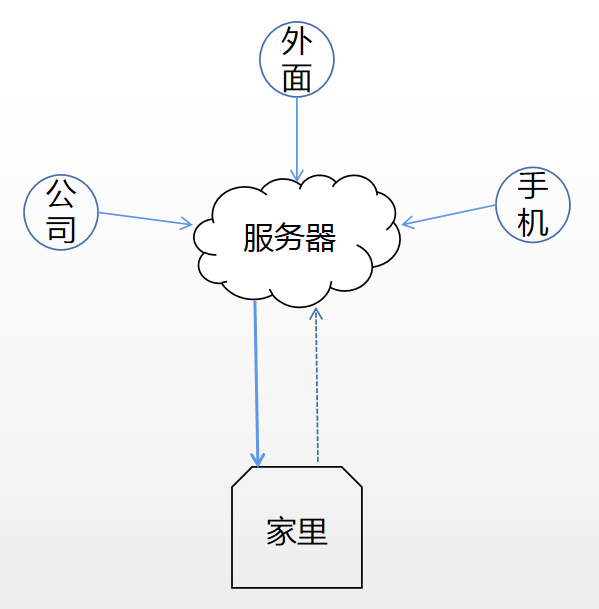
<li>服务器部署服务端 frps</li>
<li>客服端部署客户端 frpc</li>
<li>在任何可以上网的地方都可以通过服务器的 IP + port 访问到家里的客户端</li>
<li>优点： 不要部署客户端，随时随地访问不受时间、地点、设备限制</li>
<li>缺点： 受服务器带宽和流量限制</li>
<li>支持的协议 ： tcp 、udp、http、https、http_proxy 、TCPMUX</li>
</ul>
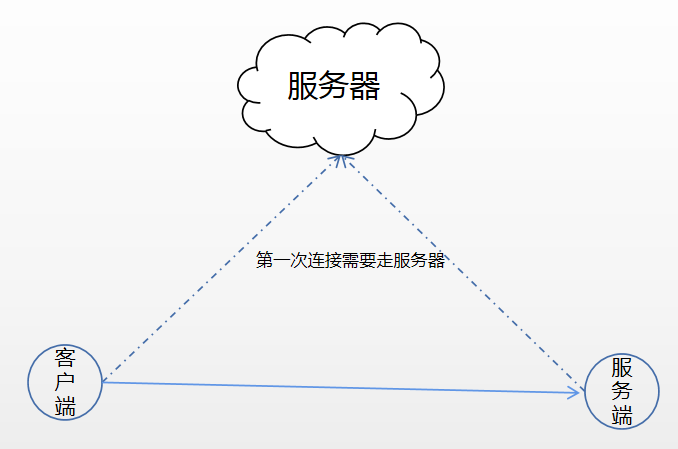
<h1 id="frp-内网-to-内网-架构">frp 内网 to 内网 架构</h1>
<figure data-type="image" tabindex="3"><img src="http://v2.shuobude.top:8888/post-images/1662127525436.png" alt="内外_to_内网" width="400" height="400" loading="lazy"></figure>
<ul>
<li>需要部署 服务器 + 服务端 + 客户端</li>
<li>优点 不占用服务器多余端口，带宽不受服务器限制</li>
<li>缺点：需要在访问的设备上安装 客户端才可以访问</li>
<li>支持的协议：stcp、xtcp、</li>
</ul>
<h1 id="frp-常见配置-frp-常见配置">frp 常见配置  <a href="http://v2.shuobude.top:8888/post/3TYmndH4U/">frp 常见配置</a></h1>
<h1 id="frp-使用说明-frp-使用说明">frp 使用说明  <a href="http://v2.shuobude.top:8888/post/1hVFq7Ue5">frp 使用说明</a></h1>
]]></content>
    </entry>
    <entry>
        <title type="html"><![CDATA[脚本说明]]></title>
        <id>http://v2.shuobude.top:8888/post/kI_z2gIcV/</id>
        <link href="http://v2.shuobude.top:8888/post/kI_z2gIcV/">
        </link>
        <updated>2022-08-14T14:26:35.000Z</updated>
        <content type="html"><![CDATA[<p>0 */6 * * * /root/get_clash.sh</p>
<pre><code class="language-bash">#!/bin/bash
TODAY=$(date +&quot;%m%d&quot;)
DAY=$(date -d &quot;1 day ago&quot; +&quot;%m%d&quot;)
HTTP_CODE=$(curl -I -m 10 -o /dev/null -s -w %{http_code} https://raw.githubusercontent.com/pojiezhiyuanjun/freev2/master/${TODAY}clash.yml)
i=1
echo -e &quot;当前\t文件\tCODE&quot; &gt;/var/www/clash.txt
echo `date +&quot;%Y-%m-%d %H:%M:%S&quot;` &gt;&gt;/var/www/clash.txt
if [ $HTTP_CODE -eq 200 ]
then
        curl  -m 10  -s  https://raw.githubusercontent.com/pojiezhiyuanjun/freev2/master/${TODAY}clash.yml &gt; /var/www/clash.yaml
else
        while [ $HTTP_CODE -ne 200 ]
        do
          DAY=$(date -d &quot;${i} day ago&quot; +&quot;%m%d&quot;)
          HTTP_CODE=$(curl -I -m 10 -o /dev/null -s -w %{http_code} https://raw.githubusercontent.com/pojiezhiyuanjun/freev2/master/${DAY}clash.yml)
          i=$((${i}+1))
          echo -e &quot;${TODAY}\t${DAY}\t${HTTP_CODE}&quot; &gt;&gt;/var/www/clash.txt
        done
        curl  -m 10  -s  https://raw.githubusercontent.com/pojiezhiyuanjun/freev2/master/${DAY}clash.yml &gt; /var/www/clash.yaml
fi
</code></pre>
<p>0 */6 * * * /root/get_ssr_vmess.sh</p>
<pre><code class="language-bash">#!/bin/bash
curl  -m 10  -s   https://sspool.herokuapp.com/vmess/sub &gt; /var/www/vmess
curl  -m 10  -s   https://sspool.herokuapp.com/ssr/sub &gt; /var/www/ssr
</code></pre>
<p>0 */6 * * * /root/get_herokuapp.sh</p>
<pre><code class="language-bash">#!/bin/bash
curl -s https://sspool.herokuapp.com/clash/config &gt;/var/www/herokuapp.yaml

</code></pre>
<p>0 0 * * * /root/get_clash_rule.sh</p>
<pre><code class="language-bash">#!/bin/bash
curl -s https://raw.githubusercontent.com/Loyalsoldier/clash-rules/release/reject.txt &gt;/var/www/clash-rules/reject.txt
curl -s https://raw.githubusercontent.com/Loyalsoldier/clash-rules/release/icloud.txt &gt;/var/www/clash-rules/icloud.txt
curl -s https://raw.githubusercontent.com/Loyalsoldier/clash-rules/release/apple.txt &gt;/var/www/clash-rules/apple.txt
curl -s https://raw.githubusercontent.com/Loyalsoldier/clash-rules/release/google.txt &gt;/var/www/clash-rules/google.txt
curl -s https://raw.githubusercontent.com/Loyalsoldier/clash-rules/release/proxy.txt &gt;/var/www/clash-rules/proxy.txt
curl -s https://raw.githubusercontent.com/Loyalsoldier/clash-rules/release/direct.txt &gt;/var/www/clash-rules/direct.txt
curl -s https://raw.githubusercontent.com/Loyalsoldier/clash-rules/release/private.txt &gt;/var/www/clash-rules/private.txt
curl -s https://raw.githubusercontent.com/Loyalsoldier/clash-rules/release/gfw.txt &gt;/var/www/clash-rules/gfw.txt
curl -s https://raw.githubusercontent.com/Loyalsoldier/clash-rules/release/greatfire.txt &gt;/var/www/clash-rules/greatfire.txt
curl -s https://raw.githubusercontent.com/Loyalsoldier/clash-rules/release/tld-not-cn.txt &gt;/var/www/clash-rules/tld-not-cn.txt
curl -s https://raw.githubusercontent.com/Loyalsoldier/clash-rules/release/telegramcidr.txt &gt;/var/www/clash-rules/telegramcidr.txt
curl -s https://raw.githubusercontent.com/Loyalsoldier/clash-rules/release/cncidr.txt &gt;/var/www/clash-rules/cncidr.txt
curl -s https://raw.githubusercontent.com/Loyalsoldier/clash-rules/release/lancidr.txt &gt;/var/www/clash-rules/lancidr.txt
curl -s https://raw.githubusercontent.com/Loyalsoldier/clash-rules/release/applications.txt &gt;/var/www/clash-rules/applications.txt
</code></pre>
<p>0 */6 * * * /usr/bin/curl -s https://sspool.herokuapp.com/trojan/sub &gt;/var/www/trojan</p>
<p>*/5 * * * * ls -l /var/www/ &gt; /var/www/update.txt</p>
]]></content>
    </entry>
    <entry>
        <title type="html"><![CDATA[API 使用说明]]></title>
        <id>http://v2.shuobude.top:8888/post/api-shi-yong-shuo-ming/</id>
        <link href="http://v2.shuobude.top:8888/post/api-shi-yong-shuo-ming/">
        </link>
        <updated>2022-08-14T07:46:50.000Z</updated>
        <content type="html"><![CDATA[<p>使用方法</p>
<p><font color=red> PS: $sk 替换成正确的SK </font></p>
<p>curl &quot;http://v2.shuobude.top/api/?sk=$sk&quot; 查看使用方法</p>
<p>curl &quot;http://v2.shuobude.top/api/get_rule/?sk=$sk&quot; 查看已经添加的规则</p>
<p>curl &quot;http://v2.shuobude.top/api/add_rule/?method=DOMAIN-SUFFIX&amp;value=qq.com&amp;sk=$sk&quot; 添加规则</p>
<p>curl &quot;http://v2.shuobude.top/api/del_rule/?value=qq.com&amp;sk=$sk&quot; 删除规则</p>
<p>================================================</p>
<p>支持的规则有如下，请按要求写</p>
<pre><code>payload:
- DOMAIN-SUFFIX,google.com
- DOMAIN-KEYWORD,google
- DOMAIN,ad.com
- SRC-IP-CIDR,192.168.1.201/32
- IP-CIDR,127.0.0.0/8
- GEOIP,CN
- DST-PORT,80
- SRC-PORT,7777
- PROCESS-NAME,qq.exe
- PROCESS-PATH,'C:\Program Files\Oray\SunLogin\SunloginClient\'
</code></pre>
<p>================================================</p>
]]></content>
    </entry>
    <entry>
        <title type="html"><![CDATA[转发配置说明]]></title>
        <id>http://v2.shuobude.top:8888/post/zhuan-fa-pei-zhi-shuo-ming/</id>
        <link href="http://v2.shuobude.top:8888/post/zhuan-fa-pei-zhi-shuo-ming/">
        </link>
        <updated>2022-08-14T07:43:24.000Z</updated>
        <content type="html"><![CDATA[<pre><code>v2.shuobude.top/vpn/  --&gt; clash.shuobude.ga

v2.shuobude.top/api/  --&gt; clash.shuobude.ga/api/
</code></pre>
<p>转发由 Tencent(frp) --&gt; home(nginx) ---&gt; bwg(caddy)</p>
]]></content>
    </entry>
    <entry>
        <title type="html"><![CDATA[V2ray&Clash]]></title>
        <id>http://v2.shuobude.top:8888/post/v2rayandclash/</id>
        <link href="http://v2.shuobude.top:8888/post/v2rayandclash/">
        </link>
        <updated>2022-08-14T07:14:35.000Z</updated>
        <content type="html"><![CDATA[<h1 id="订阅信息来自互联网">订阅信息来自互联网</h1>
<h2 id="订阅地址前缀">订阅地址前缀</h2>
<p><font color=red> http://v2.shuobude.top/vpn/sub/  </font></p>
<h2 id="查看-updatatxt-文件根据文件生成自己的订阅地址">查看 updata.txt 文件，根据文件生成自己的订阅地址</h2>
<h3 id="更新状态">更新状态</h3>
<p>vpn更新结果查看:</p>
<p><a href="http://v2.shuobude.top/vpn/update.txt">http://v2.shuobude.top/vpn/update.txt</a></p>
<h2 id="订阅后缀为-updatetxt-中的文件名如-ss">订阅后缀为 update.txt 中的文件名,如 ss</h2>
<h2 id="完整的实例参考">完整的实例参考</h2>
<pre><code>http://v2.shuobude.top/vpn/sub/ss 
</code></pre>
<p>【 v2ray 路由规则: 】 <a href="http://v2.shuobude.top/vpn/v2ray_route">http://v2.shuobude.top/vpn/v2ray_route</a></p>
<p>【 链接1:  】<a href="https://raw.githubusercontent.com/pojiezhiyuanjun/freev2/master/0701clash.yml">https://raw.githubusercontent.com/pojiezhiyuanjun/freev2/master/0701clash.yml</a></p>
<p><a href="http://v2.shuobude.top/vpn/sub/clash.txt">clash更新结果查看:</a></p>
<p>上述连接来自互联网分享，但是他的生成模式为日期结尾，这也就导致不能长期订阅，为了方便使用，我使用本地脚本的访问进行拉取，做成定时任务，每天更新4次</p>
<pre><code class="language-bash">#!/bin/bash
TODAY=$(date +&quot;%m%d&quot;)
DAY=$(date -d &quot;1 day ago&quot; +&quot;%m%d&quot;)
HTTP_CODE=$(curl -I -m 10 -o /dev/null -s -w %{http_code} https://raw.githubusercontent.com/pojiezhiyuanjun/freev2/master/${TODAY}clash.yml)
i=1
if [ $HTTP_CODE -eq 200 ]
then
        curl  -m 10  -s  https://raw.githubusercontent.com/pojiezhiyuanjun/freev2/master/${TODAY}clash.yml &gt; /var/www/sub/clash.yaml
else
        while [ $HTTP_CODE -ne 200 ]
        do
          DAY=$(date -d &quot;${i} day ago&quot; +&quot;%m%d&quot;)
          HTTP_CODE=$(curl -I -m 10 -o /dev/null -s -w %{http_code} https://raw.githubusercontent.com/pojiezhiyuanjun/freev2/master/${DAY}clash.yml)
          i+=1
        done
        curl  -m 10  -s  https://raw.githubusercontent.com/pojiezhiyuanjun/freev2/master/${DAY}clash.yml &gt; /var/www/sub/clash.yaml
fi
</code></pre>
<p>定时任务</p>
<pre><code class="language-bash">0 */6 * * * /root/get_clash.sh
</code></pre>
<p>我的地址就不提供了，大家可以自行使用脚本获取。</p>
<p>v2ray 订阅</p>
<pre><code class="language-bash">#!/bin/bash
TODAY=$(date date  +&quot;%Y-%-m-%-d&quot;)
HTTP_CODE=$(curl -I -m 10 -o /dev/null -s -w %{http_code} https://raw.githubusercontent.com/JACKUSR2089/v2ray-subscribed/master/subscribed/${TODAY})
i=1
if [ $HTTP_CODE -eq 200 ]
then
        curl  -m 10  -s  https://raw.githubusercontent.com/JACKUSR2089/v2ray-subscribed/master/subscribed/${TODAY} &gt; /var/www/sub/v2ray.html
else
        while [ $HTTP_CODE -ne 200 ]
        do
          DAY=$(date -d &quot;${i} day ago&quot; +&quot;%Y-%-m-%-d&quot;)
          HTTP_CODE=$(curl -I -m 10 -o /dev/null -s -w %{http_code} https://raw.githubusercontent.com/JACKUSR2089/v2ray-subscribed/master/subscribed/${DAY})
          i+=1
        done
        curl  -m 10  -s  https://raw.githubusercontent.com/JACKUSR2089/v2ray-subscribed/master/subscribed/${DAY} &gt; /var/www/sub/v2ray.html
fi
</code></pre>
]]></content>
    </entry>
</feed>